tl;dr: I’ve been a pebble fan for a long time. With the new hardware refresh, I wanted to start building some watchfaces.
nilcoast is live on the Pebble Appstore.
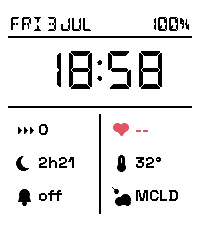
Features
- iMessage counts via BlueBubbles
- Sensor data (sleep, battery, steps, etc…)
- Weather data from wthr.cloud
- Seconds animation on shake/tap
Getting Started
- toolchain lives in
pebble-tool, installed with uv:uv tool install pebble-tool pebble sdk install latestpulls the compiler/emupebble login— logs in to cloudpebblepebble new-project <name>scaffolds the layout below
I wrote some C
Watch-side code is plain C99 against the Pebble SDK. Every watchapp’s entry point looks roughly like this — create a window, wire up handlers, open the AppMessage channel:
static void init(void) {
  draw_init();
  model_init(&s_model);
  draw_palette(s_model.invert);

  s_window = window_create();
  window_set_background_color(s_window, draw_bg());

  WindowHandlers handlers = {
      .load = window_load,
      .unload = window_unload,
  };
  window_set_window_handlers(s_window, handlers);
  window_stack_push(s_window, true);

  app_message_register_inbox_received(inbox_received);
  app_message_open(164, 64);
  ...
}
Full source: gist.
Pixel hell
Pixel perfect counts on such a small screen (numeral ink spans 8px, my icon started a row short at 7px)— I built a quick box model in C for alignment. This gives me a re-usable layout engine for future watchfaces. Feel free to use it.
Full source: gist.
static int child_main(const Box *c, int leftover, int grow_total) {
  if (c->fixed > 0) return c->fixed;
  return grow_total > 0 ? leftover * c->grow / grow_total : 0;
}
Note: Prose is mine— code was written with an LLM and a human in the loop.
Comments